LIVE PACK MARKET
Choose your next archive
Compare guarantees, foil odds, and rarity value before spending Chronicle Coins.
Shop overview hidden
FIRST-TIME SETUP
Need help earning Chronicle Coins?
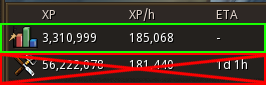
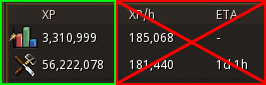
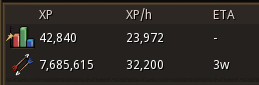
This live build requires Total XP (All Stats) to be pinned as the top RuneMetrics row and the XP column to be first. Tracking and Chronicle Coin awards pause when either requirement is missing.
PACK VAULT
Ready to reveal
Open one pack at a time or prepare a multi-pack reveal run.
Total sealed0
Pack varieties0
1 Pick an archive 2 Tear the wrapper 3 Reveal at your pace
COLLECTION COMMAND
Build the complete archive
Explore every set, find gaps, and surface your rarest foil copies.
0%complete
CARD ALBUM
Your collection
0 / 0
0 of 0 matching cards
APP PREFERENCES
Settings
These visual and audio preferences apply throughout this installation of the app.
Foil effect
Choose the screen-blend treatment used by every foil card in collections, previews, and pack reveals.
Pack sounds
Controls wrapper, card flip, reveal, and rarity sounds throughout the app.
Reduce motion
Minimizes pack, card, foil, page, and interface animation across the app.
Shop overview
Show the wallet, available-series, and Alt1-session overview above the pack shop.
Setup reminder
Show the first-time RuneMetrics setup reminder on the Shop page.
Application updates
Current version 3.5.34. Automatic update checks remain enabled.
RS3 TCG Discord
Share pulls, report bugs, suggest cards, and follow development with the Lucky Friend community.
Anonymous profile recovery
Your collection lives on the server, but clearing this app's data removes its login. Create a new recovery key and save it somewhere outside this browser.
RuneMetrics tracking repair
Clear only this profile’s stored RuneMetrics baseline when tracking is trapped by a mismatch. Coins, tracked XP, cards, packs, achievements, and account data are never reset.
Checking the stored baseline…
Reset preferences
Restore foil, sound, motion, and interface visibility settings to their defaults.
ADMIN / LEAD SANDBOX
Testing
Replay and preview app interface states without changing player data, queues, tracking state, or server records.
Client-side testing utilities
Checking role access...
No control writes to the database. Restarting setup intentionally pauses local tracking until the full guide is completed again.
Restart first-time setup
Run the complete new-player setup again. This marks setup incomplete locally, pauses XP tracking, and requires all four steps plus confirmation before tracking can restart.
Notification styles
Preview the success, warning, and error notification treatments.
Coin feedback
Preview the temporary wallet gain and loss indicators without changing the displayed or saved balance.
Button loading state
Check disabled and loading-label behavior locally for two seconds.
Testing session
No client state has been changed.
RELEASE NOTES
Changelog
See what changed across the Alt1 app, website, packs, cards, and economy.
Loading release notes...
PLAYER SUPPORT
Help & setup
Get RuneMetrics reading correctly, solve account or sync problems, and jump directly to the right app tool.
FOUR-CHECK SETUP
Make XP tracking reliable before you start
The tracker reads the visible RuneMetrics panel. These four checks are mandatory for secure XP tracking and Chronicle Coin awards.
1
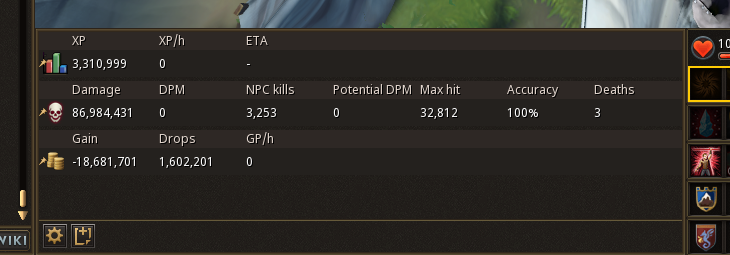
Total XP is pinned at the topThe All Stats total must be the first visible row.
2
XP is the first columnXP/h may be second and ETA third.
3
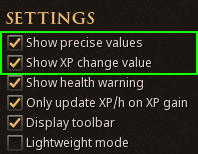
Full numbers are visibleUse 20,229,968 rather than shortened values.
4
The panel stays uncoveredKeep the header and Total XP row fully visible.
Correct layoutTotal top · XP first
QUICK START
Ready in three steps
Arrange RuneMetrics
Open the in-game tracker, pin Total XP as the first row, then use this exact column order.
Total XP row firstXP columnXP/hETA
Keep readings clear
Show precise totals and avoid covering the panel with chatboxes, menus, overlays, or another window.
Start and verify
Start XP Tracking, gain a small amount of XP, then confirm the app reports a fresh reading. Use Diagnostics if it does not.
TROUBLESHOOTING
Choose what is going wrong
No coins are appearing
Confirm Total XP is the top row, XP is the first column, use full totals, and gain new XP after tracking starts. XP carries toward the current conversion threshold shown by the app.
Account is out of sync
Only one Alt1 tracker may own the XP session. Log in again in the Alt1 window you want to keep using.
Anonymous profile recovery
Use the saved recovery key after browser data is cleared. Generate a replacement key from Settings while still signed in.
The app looks stale
Automatic updates are enabled. Check the installed version manually and reload if an update is waiting.
QUICK ACTIONS
Useful support controls
Restore the Shop reminder or move directly to the tool you need.
COMMON QUESTIONS
Answers without the guesswork
Why must Total XP be the top row?
The app now uses a hard Total XP gate. If the All Stats total is missing or appears below another row, all baseline tracking, XP awards, and Chronicle Coin awards pause until it is pinned first.
Why must XP be the first column?
The reader treats the first RuneMetrics value column as exact XP. XP/h or ETA in that position cannot be safely converted into earned XP.
Why did a small XP drop award no coin?
Verified XP carries forward until it reaches the Chronicle Coin conversion threshold currently configured for the app.
Can the website stay logged in while Alt1 is open?
Yes. Website access and one Alt1 tracker may coexist. Only a second Alt1 login replaces the active XP-tracking session.
Can an anonymous profile be recovered after cache loss?
Yes, but only with its saved recovery key. Without the key—or an earlier upgrade to a normal account—the anonymous profile cannot be identified safely.
ALT1 DIAGNOSTICS
XP debug console
QUICK HEALTH CHECK
Checking your setup...
The app is reviewing Alt1 access, RuneMetrics visibility, account sync, and the upload queue.
BACKGROUND XP TRACKER
No profile
Connect a RuneScape name to begin.
RuneMetrics reader is preparing...
Fan project notice
Chronicle Coins and cards are collection-game data only and have no real-world or RuneScape in-game monetary value.
ENVIRONMENT
Alt1 bridge state
RUNEMETRICS READER
Panel discovery and counter state
COUNTER READINGS
Latest RuneMetrics values and baseline
Visible RuneMetrics rows
No RuneMetrics counter values have been read.
Persistent baseline and current snapshot
No RuneMetrics baseline has been established.
Last confirmed XP increase
No RuneMetrics XP increase has been confirmed.
PERSISTENCE
Session and upload queue
No API diagnostic run yet.
EVENT LOG
Live diagnostic trail
Debug console initialized.
For Alt1's internal console, right-click the wrench on the app window. Alt1's Advanced Settings also has “Draw debug data,” which can reveal where its OCR search is looking.
SEND TO SUPPORT
Report a problem
Describe what you expected and what happened. The app attaches a sanitized diagnostic snapshot—passwords and full session tokens are never included.